Overtime, Shorttime & Mileage
Overtime, Shorttime, and Mileage are highly variable transactions. Unlike fixed monthly salaries, these amounts fluctuate based on actual hours worked, hours missed, or distance traveled during the specific period. As a result, they must be manually captured or imported into the payroll every month.
- Overtime: Paid to employees for working beyond their standard scheduled hours.
- Shorttime: Processed to deduct pay when an employee works fewer than their standard scheduled hours.
- Mileage: Reimburses employees for business travel based on distance covered. (Can be configured as taxable or non-taxable depending on ZIMRA limits).
Transaction Code Setup
Before you can process these items on a payslip, the respective transaction codes must be created. To avoid redundancy, please follow the step-by-step setup guides already published in the Transaction Codes section of this manual:
- Overtime: See the Earnings - Overtime setup guide.
- Shorttime: See the Earnings - Shorttime setup guide.
- Mileage: See the Other - Mileage setup guide. (Note: You may need to create separate codes for Taxable and Non-Taxable mileage depending on your company policy).
Processing Methods
When processing these specific transactions, you are required to enter the Units (the specific unit type is defined during your transaction code setup).
Ensure you select the correct processing method based on your data volume.
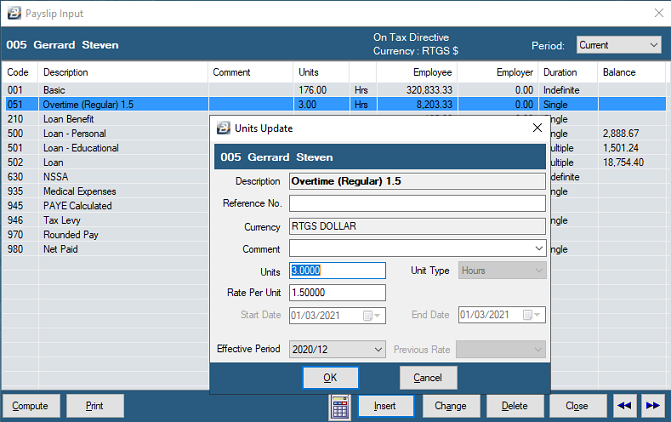
For example, if you enter 3 units for overtime prorated by 1.5, the system automatically calculates the final monetary value by multiplying those 3 hours by the employee's calculated daily or hourly basic rate and prorates it by 1.5.
Was this page helpful?