Cash & Coinage
Cash and coinage settings apply when employees are paid in cash or when Net Pay or specific Transaction Codes require coinage rounding.
Setting Up Employees for Cash Payment
- Go to Edit → Employee Master
- Select the employee
- Go to the Pay tab
- Set Payment Method to Cash
- Click OK
Configuring Coinage Denominations & Rounding
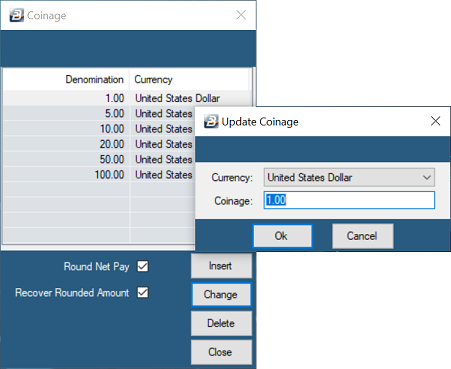
- Go to Setup > Coinage to view the currently configured denominations table.
- Click Insert to add any missing currency denominations (e.g., $20, $10, $1).
- Check Round Net Pay if you want the system to automatically round net earnings up to the lowest available denomination in the table. The rounded advancement will appear under Rounded Pay in the employee's Payslip Input for the current period.
- Check Recover Rounded Amount if the system should deduct the previously rounded balance in the following pay period. This deduction will appear under Rounded Pay Recovery in the next period's Payslip Input.
Note on Rounding: If $0.01 is omitted from the table, pay will round up to the next lowest denomination (e.g., $1.00).
Was this page helpful?