Salary Advances
Salary Advances are typically issued to employees mid-period outside of the standard payroll run and recovered on payday. Unlike formal loans, advances recovered within the same pay period generally do not carry taxable benefit implications. However, if an advance recovery extends into subsequent periods, statutory loan benefit rules may apply.
Transaction Code Setup
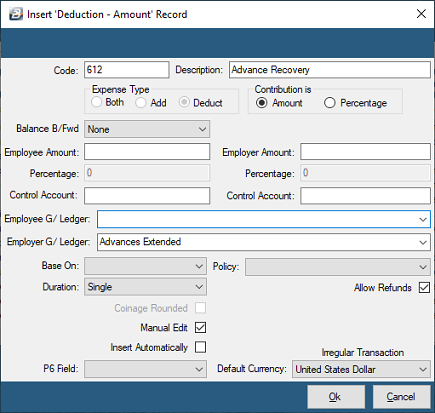
Before recovering an advance, ensure an Advance Recovery transaction code exists:
- Go to Edit → Transaction Codes.
- Check if an advance recovery code exists. If not, click Insert and select the 'Deduction - Amount' category.
- Configure the following settings:Description: Enter a clear label (e.g., "Salary Advance Recovery").Employee G/Ledger Code: Enter the General Ledger control account debited when the advance was initially issued outside of payroll.Manual Edit: Tick this box to enable entry of the advance amount during payslip input.Allow Refunds: Tick this box to allow the same code to both extend (disburse) and recover advance amounts.
Processing Advance Recovery
To recover an advance on the employee's payslip:
- Go to Process → Payslip Input.
- Select the relevant employee.
- Click Insert and select the Advance Recovery Transaction Code.
- Enter the amount to be recovered for the period.
- Click OK to save.
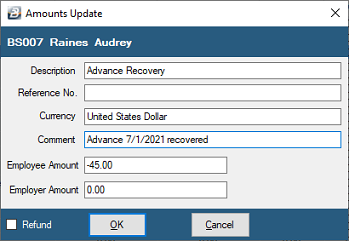
Tip: Ticking the Refund checkbox when processing this transaction will add the advance amount to the employee's payout instead of deducting it.
Was this page helpful?