Backup
Regular backups protect your payroll data from hardware failure, accidental deletion, and data corruption. Always back up before any major operation—such as Period End, Year-End, bulk changes, or data imports.
What Happens During a Backup
When you run a backup, the system captures all historical information processed in the payroll from the date of installation onward, rather than just the active period. Consequently, backup file sizes will grow over time. While backups are executed one individual payroll at a time, Belina PayrollHR stores the underlying data for all payrolls within a single SQL database.
Taking a Backup
- Go to File > Backup.
- Click the Ellipsis (...) button to select your target destination folder. Maintaining a dedicated backup directory on your hard drive helps organize your file history.
- Confirm the destination path and execute the backup process.
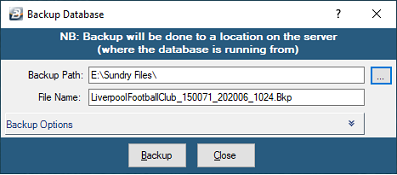
Note: This procedure only backs up the currently open payroll. To back up additional payrolls, open each payroll individually and repeat the process.
Backup Frequency & Storage
- Period-End Backups: Execute a backup for each payroll after transaction processing is complete, but before running the period-end procedure.
- Interim Backups: Perform extra precautionary backups during active periods when handling large data volumes or running routines like backpay, salary increments, or employee transfers.
- Year-End Backups: Retain year-end backups indefinitely in safe, separate locations. Never overwrite a year-end file.
Media & Retention Strategy
To avoid reliance on a single storage medium, implement a multi-layered storage strategy across:
- Cloud Storage or Online Backup Services
- External Hard Drives or USB Flash Drives
- Network Attached Storage (NAS) Devices
Maintain backup sets for every period until the full payroll year is completed. If storage capacity requires rotating media, retain a strict minimum of three historical periods at all times to ensure point-in-time data recovery.
Was this page helpful?