Medical Expenses
Employees can receive a medical tax credit for valid medical expenses incurred outside of the standard payroll deductions. These Medical Expenses can include:
- Medical aid shortfalls
- Doctor's visit expenses
- Other valid medical expenses supported by a dispensary note and receipt(s) from a pharmacy (for prescription drugs), Medical Aid Society, Registered Clinic, or Hospital.
Important Compliance Rules
- Medical expenses must be processed within 3 months of the expense being incurred. Employees must submit claims in good time, particularly for transactions near the end of the tax year.
- Original receipts must be retained for possible enquiry by ZIMRA auditors.
- Amounts processed for Medical Expenses do not form part of the employee's income or standard expenses on the payslip; their only effect on the 'Net Paid' figure is through the direct reduction of calculated PAYE.
Prerequisite: Parameter & Code Setup
Before you can process a medical expense claim, ensure your system is configured to calculate the credit:
- Tax Parameters: Ensure the Medical Credit percentage is set up correctly in the Tax Table (Go to Setup → Tax → Existing). For many years, this has been stipulated at 50%. At this rate, 50% of the entered medical expense is automatically deducted from the PAYE calculated by the system.
- Transaction Code: Ensure you have created a specific Medical Expenses Transaction Code.
Processing Medical Expenses
To process an employee's submitted medical expense claim:
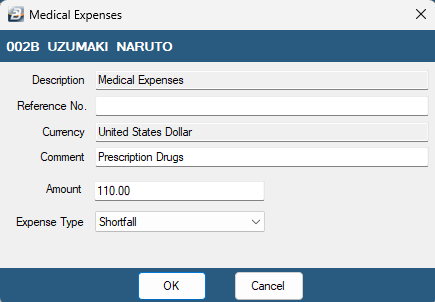
- Go to Process → Payslip Input
- Select the specific employee.
- Click Insert and select your newly created Medical Expenses Transaction Code.
- Enter the exact amount from the employee's valid receipt.
- Click OK to save the transaction to the payslip.
Verifying the Tax Credit
To ensure the system has applied the credit correctly:
- Run the full Calculate Tax Routine.
- Go to View → Tax → Tax Display and select the individual employee.
- The system will display the calculated medical credit under the credits section, demonstrating the exact amount that was offset against their PAYE for the current period.
Was this page helpful?