Calculation Routine
The Calculation Routine is a central processing function in Belina Payroll. It refreshes all transaction code calculations, accrues employee leave days, and computes tax across the entire payroll run.
In a multi-user environment, ensure no other user has the payroll open on another terminal before starting the routine.
Where to Find It
The 'Calculation Routine' option is located under the Process - Calculation Routine menu. Alternatively, you can simply click the Calculation Routine icon directly on the main toolbar.
As a precaution, Belina Payroll provides a visual warning when the routine needs to be run before finalizing a period:
- Warning Icon: Displays when changes have been made and the routine needs to be run.

- Clear Icon: After the routine completes successfully, the warning is replaced by a clear/green icon.

What Happens During Processing
During Calculation Routine, a NSSA popup screen displays. Ensure it is set up according to the NSSA guide then click Save and Continue.
The length of time taken is proportional to the number of employees and computer processing speed.
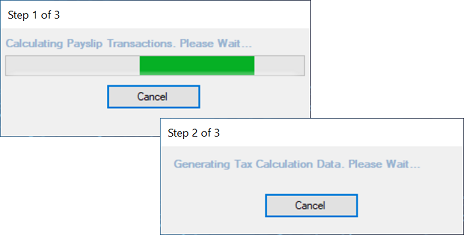
- Initialization: A 'Calculating Payroll Transactions - Please Wait' message displays.
- Tax Calculation: A progress bar shows each individual employee as their tax amounts are computed.
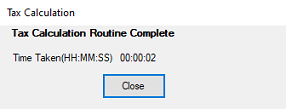
- Completion: A final screen displays the total time it took to calculate, highlights any warnings, and provides direct access to the related error reports.
When to Run
The routine can be executed as many times as deemed necessary without any adverse impact on balances. At a minimum, it should be run:
- After processing or changing payroll transaction data.
- After making updates to Employee Masterfiles or historical data.
- Before printing payroll reports.
- Before doing a period-end procedure.
Why the Routine is Essential
- Transaction Refresh: Calculations on all Transaction Codes are comprehensively refreshed.
- Leave Accrual: Leave days are automatically accrued. (Note: Leave days accrue only once—during the first time the Calculation Routine is run in a period).
Compute Button vs. Calculation Routine
While the Compute button on an individual Payslip Input screen is useful to preview results for a single employee, it does not finalize processing for the rest of the company. The full Calculation Routine must still be run.
Calculation Routine Errors
If an error is displayed once the routine completes:
- Navigate to Data → Support Menu → Calculation Routine Errors.
- A diagnostic report will display detailing the specific errors. Correct the underlying data issues on the respective employee profiles and re-run the routine.
Was this page helpful?