Service Allowance
Service allowances reward employees based on their tenure with the organization. Belina Payroll offers two distinct methods for automating these calculations: using a standard Service Allowance Transaction Code for a flat percentage, or using the Service Awards module for tiered percentages based on specific years-of-service ranges.
Method 1: Standard Service Allowance Code
Use this method if the allowance is calculated using a single, fixed percentage applied to all eligible employees. The system automatically calculates the value using this formula: Basic × Service Allowance Percentage × Years of Service.
To configure this code, follow the step-by-step instructions in the published Allowance - Service setup guide. Once created, the system will automatically process the calculation onto the employee's payslip based on their engagement date.
Method 2: Tiered Service Awards
Use the Service Awards module if your organization applies different percentages or fixed amounts depending on specific tenure bands (e.g., 5-10 years receive 10%, 11-20 years receive 15%).
- Go to 'Setup' → 'Ranges' → 'Service Awards'.
- Press 'Insert' to configure your first tenure band.
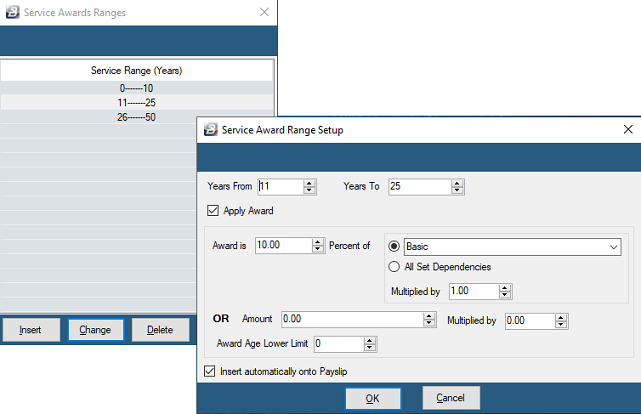
- Years From / Years To: Define the starting and ending years of service for this specific band.
- Apply Award: Tick this box to activate the award for employees falling within this timeframe.
- Award is xx Percent of: Enter the specific percentage for this band and use the dropdown to select the base Transaction Code (e.g., Basic Pay).
- Multiplied by: Set a factor to be applied to the award (e.g., entering 1.00 applies exactly the percentage specified).
- Award Age Lower Limit: (Optional) Enter a cut-off age under which no award will be paid.
- Insert automatically onto Payslip: Tick this option to have the system automatically apply this award to every eligible employee's Payslip Input without manual intervention.
- Repeat these steps by pressing 'Insert' to create subsequent bands for higher years of service.
Was this page helpful?