Loans
The 'Loan' Transaction Code is used to process the extension of loans to employees and the subsequent loan repayments. Belina Payroll allows loans with up to 999 repayment periods. The amount of the loan, the number of repayment periods, and the interest rate to be applied are entered when processing. The loan repayments and loan benefit will be automatically processed each period.
Creating a Loan Transaction Code
View written instructions
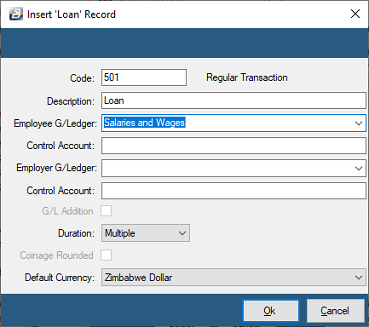
-
Go to the 'Edit', 'Transaction Codes' menu options.
-
Click 'Insert' and select the Transaction Category 'Loan'.
-
Accept/Change the default 'Code'.
-
Enter an appropriate 'Description'.
-
Select the 'General Ledger' Code to be entered onto journal reports and exports.
-
Tick 'G/L Addition' if you would like the Employee and Employer General Ledger contribution amounts to be added together to make one entry.
-
Set the 'Duration' — whether the transaction is to come through for a 'Single', 'Multiple', or 'Indefinite' number of periods.
-
Click 'Ok' to save the new Transaction Code.
Loan Adjustment
Use the 'Loan Adjustment' Transaction Code to process manual adjustments to an existing loan balance.
To create a 'Loan Adjustment' Transaction Code:

- Go to the 'Edit', 'Transaction Codes' menu options.
- Click 'Insert' and select the Transaction Category 'Loan Adjustment'.
- Accept/Change the default 'Code'.
- Enter an appropriate 'Description'.
- Select the 'General Ledger' Code to be entered onto journal reports and exports.
- Tick 'G/L Addition' if you would like the Employee and Employer General Ledger contribution amounts to be added together to make one entry.
- Set the 'Duration' — whether the transaction is to come through for a 'Single', 'Multiple', or 'Indefinite' number of periods.
- Click 'Ok' to save the new Transaction Code.
Was this page helpful?