Transaction Code Category Change
Each transaction code is assigned a category type that dictates how it is processed during Calculation Routine and how it affects FDS tax computations. If a code was assigned the wrong category during setup or requires reclassification for specific payroll needs, you can update its category through the Support Menu.
Before modifying any categories, take a backup (File→ Backup). Changing a transaction code's category directly alters how the system calculates tax and handles accumulators for that code.
Step-by-Step Procedure
- Go to Data → Support Menu → Transaction Category Change.
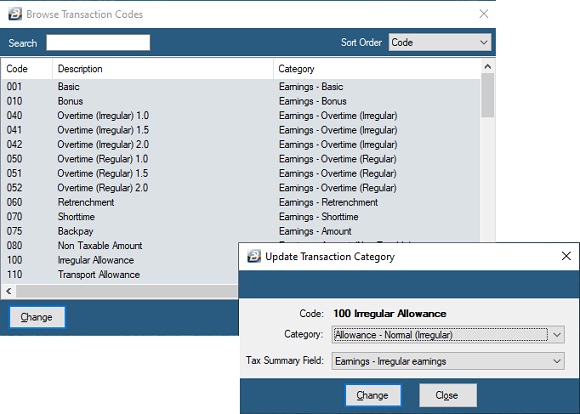
- A table displaying all active Transaction Codes will open.
- Highlight the specific Transaction Code that requires reclassification.
- Click Change.
- Use the Category dropdown menu to select the revised transaction category.
- Click Change to save and apply the new category settings.
Was this page helpful?