Periods
Belina Payroll uses Payroll Periods for each period that is being paid. Once a period has been completed and paid, a period end procedure is run to take the payroll into the next period ready for processing. These Payroll Periods are then allocated to Accounting Periods for accounting purposes.
Setting up Pay Periods
View written instructions
Before setting up payroll periods consider how many periods are actually required. The standard number of periods are:
| Monthly payroll | 12 |
|---|---|
| 4 week period payroll | 13 |
| Bi - Monthly | 24 |
| Fortnightly | 26 |
| Weekly | 52 (see comment below) |
A weekly payroll may have a varying number of periods. There may be a 51, 52 or 53 week year depending on the way in which the period end dates fall. The organization may also choose not to process the periods during an annual shutdown which may reduce the total number of periods. If the total number of periods differs from the standard number of periods, stated above, then change the number of periods under 'Payroll Maintenance '. This will ensure that the FDS tax computes properly.
PERIOD TABLE
The period table should:
- be set up with the correct number of periods for the entire year
- have the correct period start and end dates for each period (with no gaps)
- have the correct hours and days per period
To set up the Payroll periods:
- Go to Setup - Periods - Payroll Periods. The system will have automatically created the number of payroll periods that you specified when creating the payroll.
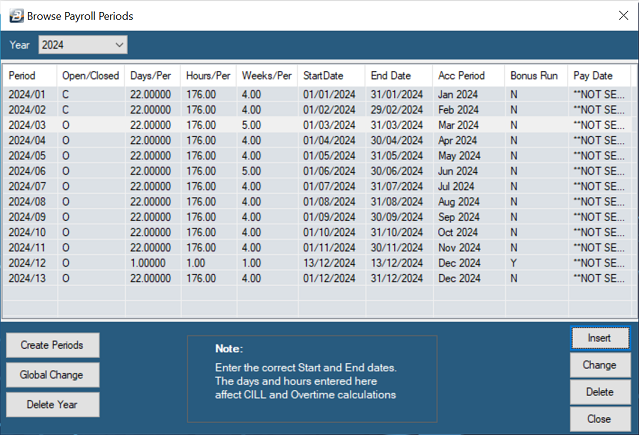
- Modify the default information, a period at a time by highlighting the entry and pressing Enter or selecting Change. The period information for all the periods can be done in one step by selecting Global Change
Global Change
To change the default Days and Hours for every period of a year in one step press 'Global Change'
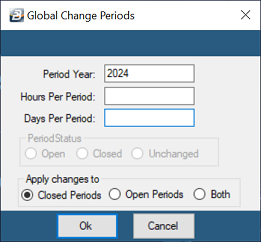
Enter the default number of Hours and Days per period for your organization. These will then be applied in every period for the Year selected.
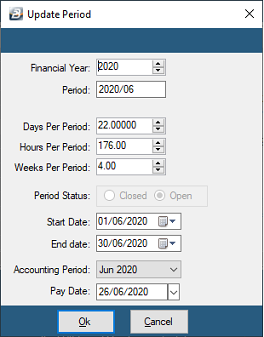
| Financial Year: | Shows the financial year that the payroll period relates to. |
|---|---|
| Period: | The payroll period being changed |
| Bonus Period: | Bonus Periods are created when the period is initially setup (see Step 5) |
| Days Per Period: | Change the default number of days per period to the number of days that apply in your organization. This is important since the number of days entered here is used in computing the daily rate of pay for someone earning a monthly salary. An example of where this is necessary is with leave pay computations where a daily rate is required. |
| Hours Per Period: | Change the default number of hours per period to the number of hours that apply in your organization. This is important since the number of hours per period is used in computing the hourly rate of pay for someone earning a monthly salary. An example of where this is necessary is with overtime computations where an hourly rate is required. |
| Weeks Per Period: | Shows, especially for Weekly payrolls how many payroll periods apply to the Accounting period in question. |
| Period Status: | Open/ Closed: When a period end is done the current period is 'Closed'. The 'Open' periods are still available for current and future processing. |
| Start Date: | Enter the Start Date for the Payroll Period. |
| End Date: | Enter the End Date for the Payroll Period. |
| Accounting Period: | The Accounting Period into which the Payroll Period belongs |
| Pay Date: | Enter the actual pay date for the period. |
Accounting Periods
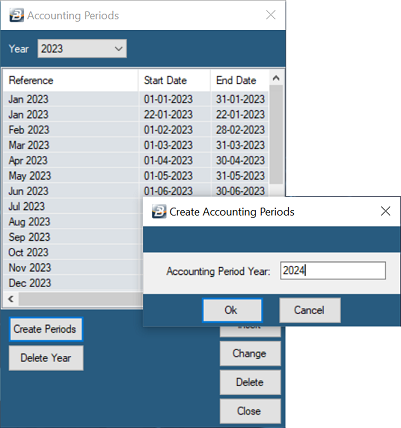
Accounting periods are used to assist in making monthly payments on a weekly payroll and also help with the consolidation of weekly and monthly payrolls. In the case of weekly and fortnightly payrolls where there are 52 and 26 periods respectively but there is usually only 12 accounting periods, one for each month of the year. Belina Payroll can allocate payroll periods to the respective accounting period for journal purposes. To set up the Accounting periods go to the Setup - Periods - Accounting Periods
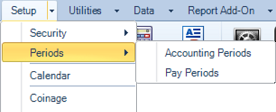
The system automatically creates 12 accounting periods, one for each month of the year. The period start and end dates are the beginning and end dates of each month which can be modified, as necessary, to suit your specific accounting period cut-off dates.
Creating a Bonus Period
View written instructions
To create a Bonus Period to process a separate Bonus Run:
- Go to Setup - Periods - Pay Periods
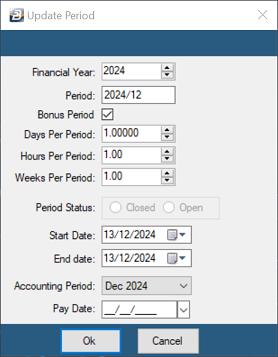
Highlight the existing period that you would like the Bonus Period to come after. Then click 'Insert' to add the new period, place a tick against Bonus Period then enter the Start Date, End Date, and Accounting Period. It will then position the Bonus Period in the correct position in the Period Table and re-number the remaining periods as appropriate.
Use this method if the bonus will be processed in this separate payroll run that excludes the Transaction Codes that would normally be processed in a period.
Was this page helpful?