Industries
There may be an employee, or group of employees, that have different working conditions to what has been set up as default in the Period table. This often occurs where people work mornings only or work the hours of a different industry e.g. security guards. Specify the number of hours and days per period that the employee works by allocating them to an industry in their employee master file.
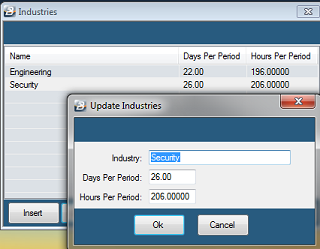
Creating an Industry
- Go to the Edit - Organizational - Industry menu options
- From the table of current Industries press Insert.
- Enter Industry details and click OK to save the Industry.
Was this page helpful?