Tax Directive
There may be good reason why tax shouldn't be deducted from an employee in the normal way — for example, a director who should instead have withholding tax applied to their director's fees rather than being taxed as a normal employee. In these cases, you can apply to ZIMRA for a Tax Directive, which gives the authority to waive or alter the amount of tax deducted from that individual.
Applying a Directive to an Employee
- Go to the employee's master file
- Open the Tax tab
- Tick Tax Directive
- Enter the directive as either a percentage or an amount, as specified by ZIMRA
Tax Directive Convert
Use this to switch tax calculation off (via a directive) for a group of employees, and later switch it back on.
To stop tax calculation:
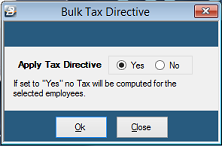
- Go to Data → Bulk Routines → Tax Directive Convert
- Select Yes to apply a Tax Directive
- Click OK
- Tag or select the employee range the directive applies to
To turn tax calculation back on: repeat the same steps, setting Apply Tax Directive to No.
Was this page helpful?