Journal & Accounting Exports Overview
Payroll journals can be exported from Belina Payroll into a variety of accounting software packages. The journal exports the payroll cost as debits (expense accounts) and credits (liability accounts), ready to be posted into your general ledger.
Prerequisites
Before exporting journals, this only needs doing once:
- Set up your General Ledger codes — see Banks & General Ledger
- Assign a General Ledger code to every transaction code that should post to the ledger
Every period after that, it's simply a matter of generating the export file.
Exporting a Journal
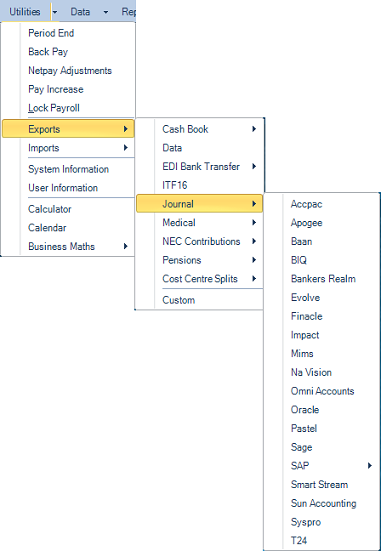
- Go to Utilities → Exports → Journal
- Select the accounting software package required
- Enter the Destination Folder and File Name
- An export file is produced, ready to import into that accounting software
For the field-by-field settings specific to each package — AccPac, Apogee, Baan, BIQ, Bankers Realm, Evolve, NaVision, Omni Accounts, Oracle, Pastel, Sage, SAP, Smart Stream, Sun Accounting, Syspro, and T24 — see Accounting Package Export Reference.
Common Concepts Across Packages
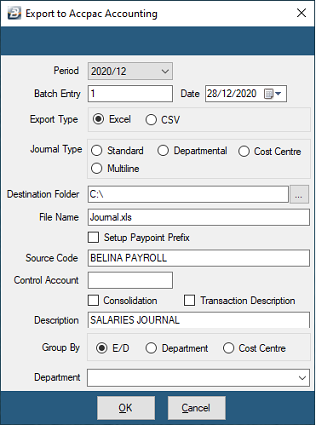
Most packages share a similar set of settings:
| Field | Typical Meaning |
|---|---|
| Period | The payroll period being exported |
| Date | The date to include in the journal export |
| Destination Folder | Where the export file is saved |
| File Name | Defaults to Journal.xls — an Excel file you can check before importing |
| Consolidation | Combines transaction lines sharing the same account number into a single line |
| Method / Group By | Groups the journal by E/D (Earning/Deduction) code, Department, or Cost Centre |
| Transaction Description | Whether a description is included on each imported line |
Some packages also support Export Directly, integrating seamlessly with the accounting package rather than producing a file for manual import — this typically requires an SDK or connection details obtained from the accounting package vendor, in addition to your Belina setup.
Was this page helpful?