Data Export
Employee Master and Transaction data can be exported from Belina Payroll for use in other software packages. This data can also be exported, edited, and re-imported back into the payroll — a convenient way to make bulk changes to employee master records.
Exporting Employee Fields and Transaction Codes
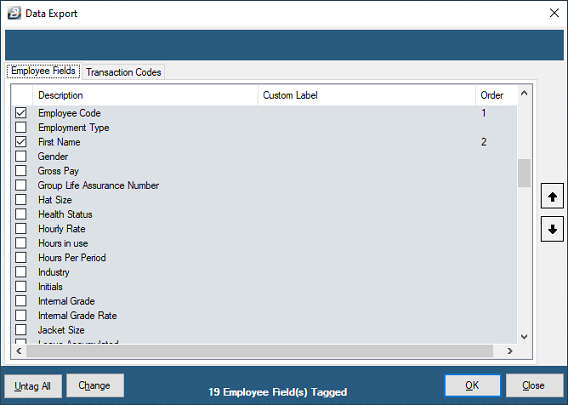
- Go to Utilities → Exports → Data
- Tag the Employee Master fields you want included
- Tag the Transaction Code details you want included, optionally setting:
| Option | Description |
|---|---|
| Split by | Divide the data by Department, Cost Centre, or Pay Point |
| Hide Zero Amt/Units Columns | Hide data lines or columns with no transaction values |
- Once both Employee Master and Transaction Code details are tagged, click OK
- Select the destination folder for the file, click Save
- Enter any range selection criteria, including the period range
- A confirmation message displays once the export completes — click OK
Viewing the Exported Data
Go to the folder where the file was saved and open it — it will contain both Employee Master and Transaction Code data (where both were selected) in spreadsheet format.
Using This for Bulk Updates
This feature is commonly used to update employee master records in bulk:
- Export the records as above
- Make the required changes directly in Excel
- Re-import the amended records back into Belina Payroll via Utilities → Imports → Excel Spreadsheet
Was this page helpful?