NSSA Transaction Code & Threshold Setup
Insurable Earnings Ceiling
NSSA contribution rates are set at 4.5% (employee) and 4.5% (employer), up to a specified ceiling. This ceiling is dependent on the Total Consumption Poverty Line (TCPL) for an average of five persons per household, and is subject to change every period. If the current TCPL figure is not available or has not been published, the last published figure remains applicable.
NSSA publishes the monthly insurable earnings ceiling on its website at nssa.org.zw.
- USD payrolls: NSSA contributions must be paid to NSSA in USD (ref. Finance Act Section 8(b)(4) of SI 169).
- Multi-currency payrolls: NSSA considers the basic amount paid in each currency and calculates the contribution due in each currency based on the proportion paid in that currency.
- If allowances and benefits exceed the combined basic amounts, the excess is added to basic for the NSSA calculation.
- APWCS: The insurable earnings ceiling that applies to NSSA does not apply to APWCS.
Setting Up the NSSA Transaction Code
View written instructions
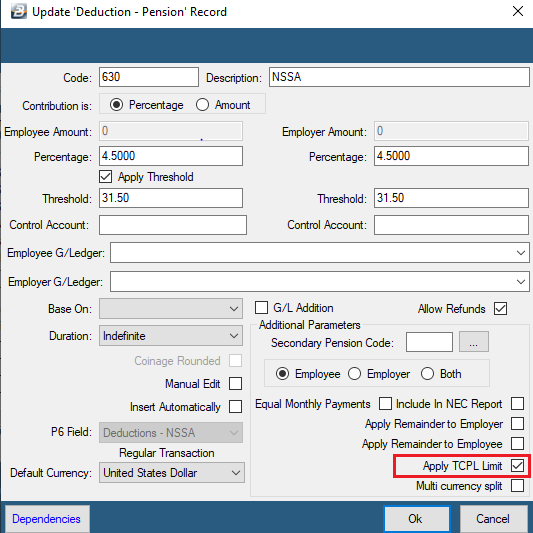
- Go to Edit → Transaction Codes
- Select the NSSA code (or Insert a new one under category NSSA)
- Set the contribution percentage to 4.5% on Employee and 4.5% on Employer
- Tick Apply Threshold
- Enter the Threshold Amount for the current period:
| Payroll frequency | Threshold Amount to enter |
|---|---|
| Monthly | The current threshold that applies |
| Weekly | Current threshold ÷ number of weeks in the current month |
| Fortnightly | Current threshold ÷ number of fortnightly periods in the current month |
- Tick Apply TCPL Limit
- Click OK to save
Contact your nearest NSSA office if you need clarification on the current TCPL limit.
NSSA During the Calculation Routine
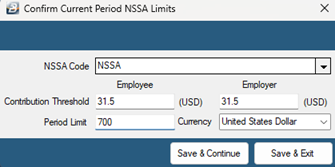
It is possible to enter the Contribution Threshold and Period Limit directly during the Calculation Routine.
The figures below were effective from 1 June 2024 as an example — always confirm the current figures on the NSSA portal before processing.
USD Payrolls
| Frequency | Contribution Threshold | Period Limit |
|---|---|---|
| Monthly | USD 31.50 | USD 700.00 |
| Weekly (4-week month) | USD 7.875 | USD 175.00 |
| Weekly (5-week month) | USD 6.30 | USD 140.00 |
| Bi-Monthly | USD 15.75 (31.50 ÷ 2) | USD 350.00 (700 ÷ 2) |
| Fortnightly (2 fortnights in month) | USD 15.75 | USD 350.00 |
| Fortnightly (3 fortnights in month) | USD 10.50 | USD 233.33 |
For each calculation routine: enter or accept the Contribution Threshold, enter or accept the Period Limit, confirm the currency is set to USD, then click Save and Continue. Repeat this each time you enter a new month.
Checking the number of weeks/fortnights in a month Go to Setup → Periods → Pay Periods and check how many weeks or fortnights fall into the accounting period you're processing.
ZiG Payrolls
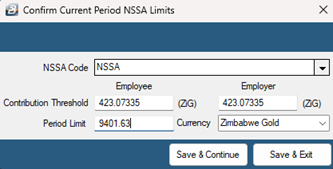
The same USD base figures apply, converted at the current interbank Mid-Rate on the day of processing:
| Frequency | Contribution Threshold (ZiG equivalent of) | Period Limit (ZiG equivalent of) |
|---|---|---|
| Monthly | USD 31.50 × Mid-Rate | USD 700.00 × Mid-Rate |
| Weekly (4-week month) | USD 7.875 × Mid-Rate | USD 175.00 × Mid-Rate |
| Weekly (5-week month) | USD 6.30 × Mid-Rate | USD 140.00 × Mid-Rate |
| Bi-Monthly | USD 15.75 × Mid-Rate | USD 350.00 × Mid-Rate |
| Fortnightly (2 fortnights in month) | USD 15.75 × Mid-Rate | USD 350.00 × Mid-Rate |
| Fortnightly (3 fortnights in month) | USD 10.50 × Mid-Rate | USD 233.33 × Mid-Rate |
Make sure the Period Limit currency is set to ZiG before clicking Save and Continue. Repeat this process every time you enter a new month, since the Mid-Rate changes.
Was this page helpful?