NSSA P4 Report & Export
NSSA payroll details in Belina Payroll are produced in the NSSA P4 form format and uploaded to the NSSA portal. The P4 ensures a correct apportionment of funds between NSSA POBS contributions and the Accident Prevention and Workers' Compensation Scheme (APWCS).
Generating the NSSA P4 for Upload
- Go to Utilities → Exports → Pensions → NSSA P4
- Enter the Account Name, Employer SSR No, and Employer EC No
- Click OK to proceed
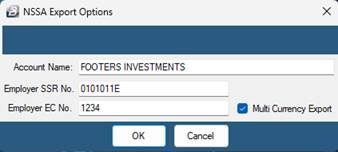
For Multi-currency payrolls Tick Multi currency Export. This generates two NSSA P4 reports — one in USD and another in ZWG — split according to the currency proportions used.
- On the Range Selection window, select the employee(s) to include. If none are selected, the report is generated for the entire payroll.
- Click OK to proceed
- Specify the destination folder for the NSSA P4 file.
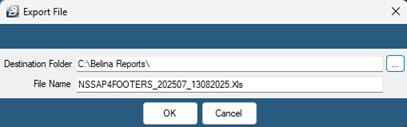
- Click OK — Belina will export the file
- Log in to the NSSA portal, browse for the generated NSSA P4 file, and upload it

Generating an NSSA P4 for Internal Use
Sometimes you may need a P4 report purely for reference — for internal purposes, or for a NSSA review without a formal submission.
- Go to View → Third Parties → Pensions → NSSA P4
- Enter the organization's NSSA details
- Generate the report
This version is for information purposes only and is not intended for upload.
Was this page helpful?