Employee Re-Engagement
Employee records remain in the database regardless of whether an employee has been discharged. Reactivating a discharged employee simply restores access to their details so they can be processed on the payroll again. There is no need to re-enter their information; however, their details should be updated for any changes that may have occurred during their absence.
Note: When an employee is currently discharged, it is not possible to process transactions or change employee master details until they are reactivated.
To reactivate a discharged employee:
- Go to the 'Edit', then 'Employee Master' menu options.
- Tick the 'Discharged' checkbox in the top right-hand corner of the 'Employee Master Records' listing to view hidden staff. (A discharged employee will have a 'D' against their name).
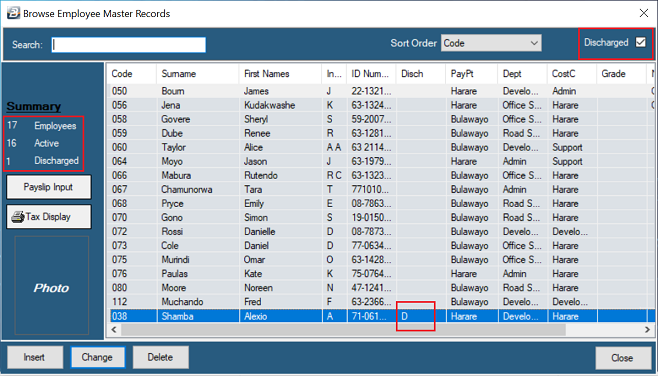
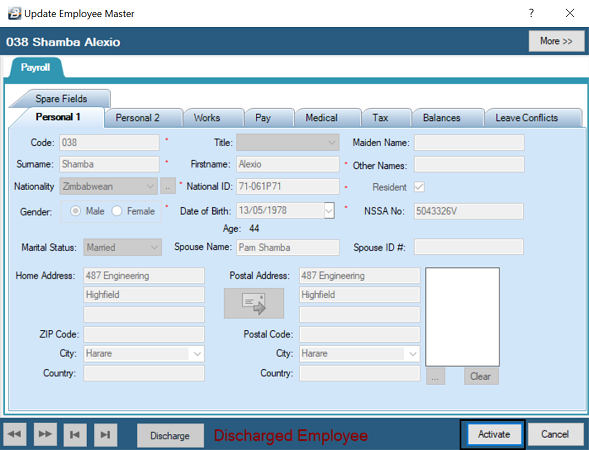
- Select the employee to be reactivated by highlighting their name and pressing 'Change', or by double-clicking on them. (You will notice the words 'Discharged Employee' displayed at the bottom of each tab of their record).
- Press the 'Activate' button.
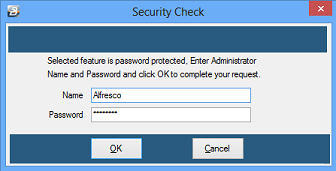
- Enter an authorized 'Name' and 'Password'. (Note: This function is only available to users with the appropriate security clearance)
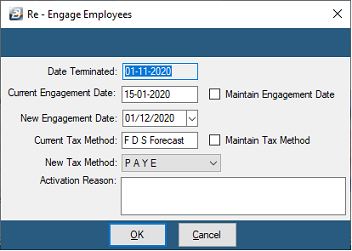
- Enter the details of the re-engagement into the activation window (see the Field Explanations table below).
- Once activated, the system's audit trail will automatically record the event. (This can be viewed in the 'Masterfile Changes' report found under 'View' > 'Exceptions' > 'Masterfile Changes').
Field Explanations (Activation Window)
| Field | Description |
|---|---|
| Date Terminated | The date on which the employee was previously terminated. |
| Current Engagement Date | The original engagement date currently saved in the Employee Master Record. |
| Maintain Engagement Date | Tick this checkbox to retain the original engagement date in the system, rather than replacing it with the new re-engagement date. |
| New Engagement Date | If you are establishing a new engagement date, enter that date here. |
| Current Tax Method | Displays the method of calculating tax that was being applied to the employee before termination. |
| Maintain Tax Method | Tick this checkbox to keep the tax calculation method the same as it was previously. |
| Activation Reason | Enter the specific reason why the employee is being reactivated onto the payroll. |
Was this page helpful?