Employee Deletion
Deleting an employee against whom payroll transactions have been processed is strictly not recommended. Deleting this data directly affects your reports—if a report is run for any prior period, the data for the deleted employee will be completely missing. It is always better to Discharge the employee instead, as this retains their historical data and is the preferred method required by auditors.
Backup Recommendation: If an employee must be deleted (e.g., they were entered in error and have zero transactions), we strongly advise that an interim backup is taken before doing any of the following steps. This precaution enables the system to be restored to its previous position if a mistake is made.
To completely delete an employee and all associated data:
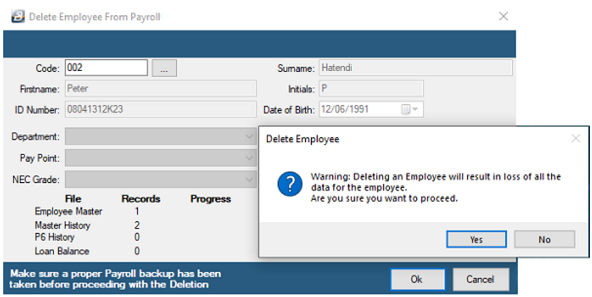
- Go to the 'Data' > 'Deletion of Employee' menu options.
- Use the ellipsis
...button to look up and select the specific employee being deleted. - Ensure that a good backup of your data has been done.
- Press 'OK' to continue with the deletion.
- Press 'Yes' to confirm the deletion.
Was this page helpful?