Bulk Employee Masterfile Changes
Use the 'Employee Masterfile Changes' bulk routine to simultaneously update specific field entries across the Employee Master records of selected employees.
To perform bulk masterfile changes:
- Go to the 'Data', 'Bulk Routines', then 'Employee Masterfile Changes' menu options.
- Tick one or more checkboxes for the specific field(s) you would like to change in the employee master records.
- As each field is selected, use the corresponding dropdown menu on the right-hand side of the screen to select the new value or setting required.
- When your changes are configured, select either 'Apply to All' (updates every employee on the payroll) or 'Apply to Selection' (opens a range selection window enabling you to tag and update only specific employees).
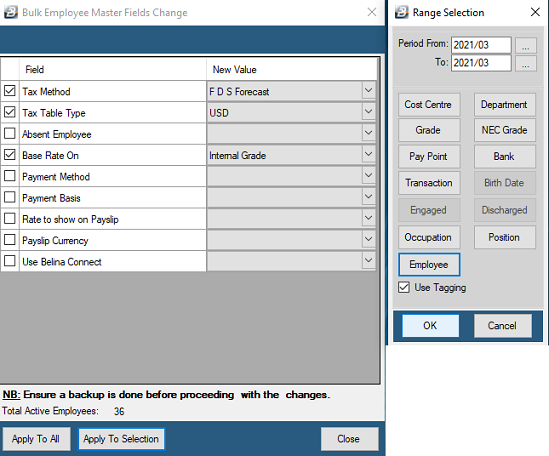
Available Fields for Bulk Update:
| Field | Options | Explanation |
|---|---|---|
| Tax Method | FDS Forecast, FDS Average, Non-FDS | Change the default FDS tax calculation method to one of the available options. |
| Tax Table Type | Default, USD | Change the Tax Table currency type used in the tax computation for each employee. |
| Absent Employee | Yes, No | Mark a group of employees as absent. (Particularly useful when dealing with contract/farm labor where one group of employees may be at work one period and then not the next). |
| Base Rate On | Master, Internal Grade, NEC Grade | Change the basis on which Basic Pay is determined. |
| Payment Method | Cash, Cheque, Savings, Transfer | Change the default method of payment for a group of employees. |
| Payment Basis | Period, Daily, Hourly | Change the basis on which a group of employees is paid. |
| Rate to show on Payslip | Period, Daily, Hourly | Specify which rate of pay will display on the printed payslips. |
| Payslip Currency | Selection available | (Multi-currency payrolls only): Payslip Input shows transactions in one currency only. Select the specific currency to be used. |
| Use Belina Connect | Yes, No | Specify whether the Belina Connect module is integrated into the payroll for these employees. |
| Cost Centre | Selection available | Update the Cost Centre assignment for a group of employees. |
| Department | Selection available | Update the Department assignment for a group of employees. |
| Paypoint | Selection available | Update the Paypoint assignment for a group of employees. |
| NEC Grade | Selection available | Update the NEC Grade classification for a group of employees. |
| Internal Grade | Selection available | Update the Internal Grade classification for a group of employees. |
| Industry | Selection available | Update the Industry classification for a group of employees. |
Was this page helpful?