Period End
The Period End procedure rolls the payroll forward from the current period into the next. It carries forward standing transactions, updates leave and loan balances, shifts previous period information into the history file, and sets up the system for fresh processing.
Pre-Conditions Checklist
Before initiating a period end, verify that the following steps are complete:
- All processing for the current period is fully finished.
- The Calculation Routine has been successfully run, results verified, and all necessary reports printed.
- All open windows within the payroll are closed.
- A reliable backup has been captured.
- Only authorized users with the required security level execute this routine.
Period End Procedure
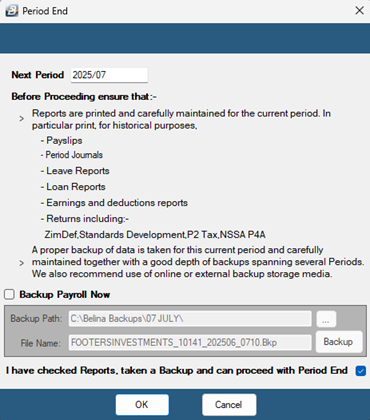
- Navigate to Utilities > Period End. A reminder screen will appear prompting you to confirm that a proper backup has been taken and reports have been printed.
- Review the displayed next period number. If you need to skip forward to a subsequent period without processing intermediate data (such as during an annual shutdown), enter the target period number.
- If a backup has not yet been completed from this screen:Tick the Backup Payroll Now check box.Select the target destination location for the backup file.Click the Backup button. Once the confirmation message appears, click OK.
- Tick the confirmation check box at the bottom of the screen to acknowledge that you have checked reports, taken a backup, and are ready to proceed.
- Click OK to execute the rollover.
Was this page helpful?